Top Blogs
Powered By Invesp

Jun 2, 2011

10 Steps To Achieve High Search Engine Rankings

Achieving High SEO Search Engine
Ranking


Very few topics have inspired as many tangents, as much false
information . . . incurred as much abuse as search engine optimization.
With the few shreds of information search engines reveal about their
actual methodologies, optimizers struggle to get that extra edge over
the competition, armed with esoteric theories of keyword density,
precise meta-tag length, optimal internal linking, and just about any
other detail that a search engine might happen to factor into its
rankings. Before you find yourself scrambling to create ten more
content-less pages to avert that worst than death curse of decreased PageRank, try to take a look at the big picture. Barring design factors
that may not be search engine friendly, a strong foundation based on
four factors will give your site good success. These factors are the
holy grail of optimization:


1. Get relevant links to your site anchored to keyword rich text.

2. Write focused body text that targets specific keyphrases or that is
focused on a specific topic (This occurs naturally when someone is
communicating useful information. This can be a problem because a lot of
businesses don’t have anything useful to say. Be detailed. Be helpful.
This can naturally accomplish what automatic text generators try to
accomplish through keyword density and keyword proximity calculations).


3. Write concise titles focused on useful keyphrases.

4. Be patient. You may not be using the best strategies, but you’re
using strategies that work over time. Continue to get links and create
more content.


Find the Words


Before you can write good, keyphrase-focused body text or titles, you
need to find the phrases users search. For good keyword suggestion
tools, search Google with (surprise, surprise) “keyword suggestion
tool.” Digitalpoint.com has an excellent tool that compares Wordtracker
and Overture keyword results. Judge from the search volume how
competitive each word is (not even close to the best method, but it’ll
have to due). Be specific. Pick words with large search volume and
search with geographic terms if you serve only a specific area. From the
list of keyphrases, start thinking about the topics you’ll want to
target. Find a few phrases for each page in your site. Remember to focus
on phrases and not separate words – make sure these phrases appear in
your body text.


Titles


HTML titles go between the title tags in your site’s code. Write short
titles that use one or two keyphrases. Don’t use the name of your
company unless you are trying to brand the name. Include location if you
target certain areas, and make sure your pages repeat this location
information in the text. Your body text should be written to fit the
phrases in your title.


Body Text and Navigation


Be specific about what you are talking about. In your navigation don’t
use generic linking text like “home” or “about us.” Use specific
phrases. Instead of “home” use the name or category of your main
service/product, and make it obvious from the context that this is your
main page. Instead of “about us” use a phrase like “A (main
product/service) Company.” This communicates more information to the
user and includes a keyphrase. Where appropriate, make the same type of
substitutions in the body text. Use variations of nouns and verbs,
including plurals and different conjugations.

If you can, use the heading tags (h1, h2, etc.) to write text titles.
Try to communicate as much as you can in text – search engines don’t see
the text in images, or fancy media like Flash. Alt tags are useful, but
search engines don’t put as much weight on them as visible text. In
general, whatever has a greater chance to be seen by the user is going
to get greater weight from the search engines (Except for those things
produced by JavaScript, or Flash, or written into an image – use common
sense).


Build Links

It is remarkably easy to get your site indexed by the search engines –
just submit to some of the many free directories. To find some of these
directories search for “free directory list” in Google. Be careful to
read submission guidelines, and be very careful about what you submit to
large directories like DMOZ. Generally, titles should not be a list of
keywords. Most directories only want your homepage and the “official
title” (somewhat ambiguous term) of your site with a short description.
Descriptions should be factual, and they should be written in complete
sentences or meaningful phrases. Some optimization companies will rip
you off by charging you money to submit your site to the major search
engines – this is a waste of time. Start building links, and the search
engines will find your site naturally, submitting makes no difference in
your rankings.

It is important to get links from sites that are related to yours. Write
webmasters requesting a link, find niche sites that offer free
submissions, write articles for sites that allow you to put down a
signature link, or post comments in forums that allow you to put down
your signature.

If you exchange links, be careful who you trade with. Get listed
wherever you want without fear of penalty from the search engines, but
be careful who you link to. Your site can get penalized for linking into
bad neighborhoods spamming the search engines.


It Never Ends

Expand your site and continue to tell people about its content. It’s an
ongoing process. The older your site gets, the more credibility it can
gain with the search engines. Keep your content fresh. Check the search
engines to see what they have indexed (search site:www.domain.com). Be
patient and keep up with search engine changes

SEO Tips for launching a new website

What is SEO and do I need it
SEO is the process of driving more quality traffic (“visitors”) to your web site from a search engine via the organic (“natural”) listings.
Organic search results are returned free of charge by a search engine and as such you are not charged every time someone clicks on a link to your website.
The process of SEO has to consider how search engine algorithms work, how “bots” crawl your website and what keywords people would key in to find your site or what products or services you sell.

How does SEO work
We have just demonstrated the process of SEO to you, How? We hear you ask, well you are probably reading this page or came to this website because you found us listed on a search engine like Google, Windows Live, or Yahoo, there you go that’s what SEO is all about, you type in a search phrase or keyword, a list of website are shown in the results, you click on a website you think can answer your question or provide you with a product or service your looking for, you visit the website and bang job done, that’s what SEO is all about.
Now if your in business can you afford not to have your website listed on the first page of the major search engines, well probably not because the chances are your competitors are already there and are no doubt “raking it in” with all those visitors that come to their website, after all if your not listed then how would these people find you.

Google SEO tips
There are over 200 factors (some listed below if you fancy a bit of DIY SEO) which Google can use to determine where your page should list in the search engine results (SERPs).
How may of these factors are used when scoring your website or web page is based on your competition and your website theme along with how complex your website is.
Here is a list of some of those factors based on our research and knowledge within the industry and we would like to stress that this is from our knowledge.
The SEO rules listed below are not listed by any relevance as at the end of the day that exercise is down to you along with your type of website and competition.
Please note that when we refer to the word keyword it can mean either one word or multiple words that are always together when users search the internet for a particular product or service, i.e. “SEO” is a keyword as is “SEO Company”.

Domain name factors

Main keyword in domain name
This helps and can add points but it’s not as important as it used to be.

Top level domain name extensions
(TLD)What sort of domain extension you have can get you points without doing anything.


.gov gets very high status
.info can get high status depending on topic
.edu gets very high status
.org can get high status.

What you need to do is have a TLD that is based in your country or the country you are aiming at, i.e. co.uk for UK companies or for people searching in the UK.

Internet users also look at the extensions of a domain in the search results and many will click on links that they think are in their own country.
Try to avoid domains like .uk.com, as these are hard for your customers to remember and seem not to rank well for searches based on the country your aiming for.

Age of domain
Old websites do well, older websites are more trusted if they stay within the same topics or themes.
New websites are not so trusted and can end up in the Google sandbox, it can take up to 6 months to get out of the sandbox if you have a good website.
In some cases we have seen it take up to 1 year to get out of the sandbox, this can depend on your type of website and theme.

URL factors

Main keyword in URL
This is a must and scores big points, use hyphens or underscores to separate words.

However Google can see the separate words even if they are all joined up.
Not to many words as that can be classed as spam, (max 5) with a max of 3 hyphens or underscores and use one or the other, not both.

URL length
Keep this to a minimal but try to use your main keyword or even what someone might key in as a search term, i.e. “Google_SEO.asp”.
Caution should be used as if it’s to long you could raise a flag for spam.
Less than 50 characters is a better idea.

Meta tag factors

Description Meta tag
Still in use and is often displayed as the search result text.

Must show theme with a max of 200 characters and no special characters.

The description must be unique to each page.

Keywords Meta tag
Apparently not used by Google, but we still use it as "G" are not the only search engine out there, could be used if the bot has problems working out what your real keyword are, Max 10 keywords words and every world must be on your page.

Robots Meta tag
Only needed if you want to stop your page being indexed

OR

If you don’t want the description from the open directory project to be used then use the robots tag with NOODP

Author Meta tag
Have seen this used by other search engines, so pop it in with the name of the author of the web page.

Copyright Meta tag
Have seen it used by other search engines, use it for any copyright info and normally you just put the company name or domain name in.

Web page content factorS

Main keyword in the title tag
This is a must and scores massive points, use | to separate keywords
First or second word using the main keyword is best
Title tag 5 to 60 characters max, also max 3 special characters, unique for each page.

Latent Semantic Indexing
This is one of the biggest factors when writing content for your web page.
Latent Semantic Indexing is really synonyms, but based on user browsing habits rather then synonyms from a dictionary.
A lot of time can be taken up writing content that includes other related words to the main keywords of your web page.
i.e. people who search for “labels” also looked at sites that provide “stickers”
Therefore Google will relate the word stickers to labels meaning that if you have a web page with both words on then you are more related than a page with only one of the words.
Extra caution should be used with this, it’s easy to over do and end up being marked down for spamming.

Keyword density in body text
Aim between 10% to 30% of total words in you total content.
Some keywords are sensitive to the total amount, other keywords are sensitive based on topic or theme so % threshold varies.
Individual keyword density in body
2% to 10% Max depending on the total amount of text or content on your page

Keywords inside H1, H2, H3 tags
These must be used correctly, Not to many, but does depend on theme and topic.
H1 at the top of page using main keyword followed by H2 but only if needed then H3 if required.

Keyword font size
This must be used correctly based on your page layout as putting in large text inside normal size text can make the website look messy and put your visitors off.
Idea is to use in headings where you have already used H1, H2 and H3 tags.

Keyword font weight
This is a must and is a good idea around the beginning of a sentence where you keywords are highlighted by using bold or strong, Google treats bold and strong as almost the same thing so you should use either based on what looks best for your web page.
Italic can also be used and scores points if used in the correct way, normally used when quoting what someone has said or a slogan of some sort.

Keyword proximity
It’s best to place your main keywords at or around the beginning of a page, usually best when within the first 20 words.

Keyword prominence
This would be a mixture of keyword proximity, keyword font weight and keyword font size.

Keyword stemming
Used to try and match words that might be keyed in during a search.
i.e. Google, Google’s, Googled etc

Page freshness
Google loves fresh pages, ones that are updated over time, have new content added.
This must be done very carefully as some pages should never really change and some pages should only have small changes done every now and then.
Home page should not really change unless you have a new service to offer, have a small news section on it, or have things like special offers displayed, otherwise this could cost you in your listing or a loss of some of your main keywords.
Other pages like About Us, Contact Us, Terms and conditions should also only be updated for good reason.
Info pages, product pages, news pages, special offer pages etc, should always be updated on a regular basis.
Depending on the page in question, updates should be once a week or once a month otherwise Google may have trouble keeping up with you and will cause visitors to “bounce” which is a bad thing.
Frequent updates will lead to frequent spidering which in turn leads to a newer search engine cache.

Content changes
As above but there should be a ratio between new pages and old pages.
The same can be said for updated pages, how much new content to old content.
The % ratio varies depending on page size and website size along with the theme of the website or sub directory.
Between 10% to 30% a month is a good idea but again it’s based on what the page does.
Content changesAs above but there should be a ratio between new pages and old pages.
The same can be said for updated pages, how much new content to old content.
The % ratio varies depending on page size and website size along with the theme of the website or sub directory.
Between 10% to 30% a month is a good idea but again it’s based on what the page does.

9 Tips Build Your List

Ever wonder how to build your list quickly and easily? Read this article to see how you can use these nine techniques to build a responsive mailing list.

(1) Create High, Quality Content

Create good, quality content on both your website and within in your newsletter. Nothing keeps readers interested as well as useful and helpful information. Use your education and experience to write tips, how-to and definition pieces for your core audience. Good content keeps a list strong and growing by word of mouth.

(2) Don’t Stop Adding Content

Keeping add articles to your newsletter. You want web visitors to see a great archive of older material. Nothing presells better than a “library” of old issues. By placing your subscribe form on each archive page, sooner or later a browser or “lookee-lous” will turn into a genuine subscriber.

(3) Do Your Keyword Research

Write your newsletter based on what your niche market is looking for. All keywords have minor keyphrases or related keywords that people also search on. Use good keyword tools to find those popular keywords and related search terms to write about. Search engines will index the archive issue bringing more visitors.

(4) Submit Articles to Niche Directories

Use search engines to locate niche article directories that match or are related to your market. Write small articles to take advantage of this little used promotional method. Add a good resource box listing a weblink to the mailing list signup page.

(5) Be helpful in Forums

Take the time to register with forums that discuss the problems of people in your niche market. Add comments or helpful hints on discussions that relate to your website or newsletter. Use your forum signature line to post a weblink to your mailing list landing page.

(6) Post Ads in Forums

Some forums have either free or paid advertising sections where their users can post ads selling services, etc. Use this service to lead interested readers to your mailing list subscriber form.

(7) Use Email Discussion Lists

While not as popular as they once were, you can probably still find a good email discussion list that serves your niche market. Join the list. Read a few issues and then start a related topic. Take a strong position on whatever the issue is. People enjoy reading slightly controversial emails. Just don’t get too hand and violate the list’s policy. Use a weblink back to your website and mailing list.

(8) Create a Squidoo Page

Use this popular Web 2.0 content management system, to post articles, videos or podcasts about your niche market. At the bottom of each article, list your email list squeeze page.

(9) Create a “Current Events & News” Blog

Go to Blogger and open an account. Create a blog that you use exclusively to “chase” the latest fads and hottest trends in your niche markets. Write quick and breezy, “who, what, when, where, why” news-style stories. At the bottom of it one have a link to more “news” and your newsletter signup form.

6/04/2007 6 Tips to Drive Traffic to your Site

1. Optimize Your Website
It is a matter of SEO. Maybe you have never heard of it. Even though you heard about it already, not everyone is familiar with it. In fact, Search engines will look at both the internal and external profile of your website while assigning a rank to a web page.
Internal profile of a website (which is so-called On-Page Optimization) includes usage of meta tags, heading tags, keywords, targeted content, and internal linking of website. External profile of your website defines the websites that are linking to your website. It also defines the pages where your link is placed. Besides, it identifies the Page Ranking of those pages along with the placement of your link. And it also includes the number of inward links you are getting. Using the relevant keywords in anchor text gives a boost to rankings on the search engine result pages (SERPs). For more information on On-page optimization, please refer to our relevant posts in Da Adsense Code.

2. Linking Your website
After talking about the on-page optimization, here comes to off-page optimization. More often, webmasters only focus on on-page optimization, and neglect the presence of off-page optimization. In the world of internet, there are two kinds of links - External Links and Internal Links. External Links define the websites that are linking to your websiteInternal whereas Links refer to the internal linking of web pages. Getting links from other websites is the most powerful tool to drive traffic to your website. The results are instantaneous and highly effective. Getting links from quality websites with higher PR and proper anchor text definitely helps your site a lot and results in more fruitful traffic from search engines. Half the battle is won if you are able to provide the links in abundance. There are many tools available for automatically building links to your website. There are some link exchange directories on the net which are a good support in link building campaigns. However, the use of these support systems depend entirely on your beliefs and strategies. Proper inter-linking (that is intra-linking) of your web pages is also relevant and significant in driving traffic.

3. Post Articles
It is important that you publish and post more and more articles on the net or article websites. This gives you an advantage as it gets incoming links to your website. Posting unique articles catering to the interest of a large number of readers is also an effective way of driving organic traffic to your website. Well written articles bring more traffic to your website. More traffic means more profit for you. It is observed that as the PR of your website increases, the AdSense payouts also increase. You can hope to get many more internal links to your website through this medium. Search engines take into account the number of quality back links while assigning rank to your website. If visitors reading your articles are interested, they will check out your website and you will have increased number of links. In comparison to the links that point to other websites from your website, the links that point to your website give more points to your rankings.

4. Anchor Text
Anchor Text refers to the clickable text of a hyperlink. Anchor Text plays an important role with regard to the target traffic as well as the search engine rankings. An appropriate Anchor Text apprises the visitors of the content of the page it links to.
Besides, Anchor Text gives a real clue to the search engines regarding the content of the web page it links to. The right Anchor Text improves your website’s search engine ranking. That’s why it’s imperative to pick the Anchor Text astutely.
Google reckons Anchor Text to be an indicator of the page relevance. Google, using its special operator “allinanchor:keyword”, separately indexes the Anchor Text. Given below are some tips for choosing the right Anchor Text that suits the search engine algorithms, and attracts the right traffic.

5. Tools
To a lesser extent, website tools makes your website user friendly. It is recommended that you make use of the tools that are visitor friendly. New scripts and innovative schemes for the visitor help you get more inward links. This in turn builds traffic to your website. You should add the tools that are attractive. For example, you can offer free e-books, or introduce new exciting sections relevant to your website. This will make your website exciting for the visitors. Google loves unique content. It richly rewards the websites that provide more content and better facilities to the visitors. Google likes genuine of traffic coming to your website from Ad Sense network. Genuine traffic yields higher payouts. Website tools makes your website a genuine one. The credibility of your website increases the probability of your website getting high paying ads via Google.

6. Target Niche Keywords
It is important for you to identify the niche markets. This will enable you to fetch the traffic that has not been targeted much, and at the same time gels well with your industry. If your competitor is leading with X traffic on one keyword, you can compete with him by targeting ten niche keywords. This will give you the same amount of traffic. Keyword country provides you with hordes of niche keywords. These niche keywords bring more target traffic to your web pages. This results in a better ROI (if you are selling products or affiliates) or an increased Adsense CTR (Click Thru Ratio) of your ads.

500+ List free directory

www.mm99.info/websitedirectory
www.01webdirectory.com
www.01wholesale.com
www.0991totalbox.com
www.1020style.com
www.123ezsearch.com
www.135yourdir.com
www.1-4a.com/links/
www.159resource.com
www.192directory.co.uk
www.192insurance.co.uk
www.1americamall.com
www.1do3.com
www.1freebieseeking.com
www.1stw.com
www.22pankali.com
www.24listing7.com
www.2searchsports.com
www.2-surf.net
www.44simple.com
www.555worldwideweb.com
www.69maximumwebdir.com
www.707flex.com
www.71k.net
www.777media.com
www.889ezone.net
www.999viva.com
www.a1alllisting.com
www.ababba.com
www.abcsubmission.com
www.abilogic.com
www.absolutedirectory.com
www.addlinksnow.com
www.addyourlinkFREE.com
www.addyourlinks.net
www.addyoursitefreesubmit.com
www.a-free-directory.info
www.agada.info/web-directory/index.php
www.aguoru.co.uk
www.aha.co.za
www.alladvertisingonline.com
www.Allfreethings.com
www.allnyou.com
www.allshops.com
www.allshopsmidwest.com
www.alphadir.com
www.am-directory.com
www.amray.com
www.anews4u.com
www.anotherwebdirectory.com/directory.php
www.anyrequests.com
www.apexoo.com/directory
www.arakne-links.com
www.aroundirectory.com
www.articlecodex.com
www.artweblinks.com
www.ask-sherlock.co.uk
www.asparaclub.com
www.assetprotectionplus.com/links/index.html
www.atixa.com
www.atlastraveldirectory.com
www.atmike.com
www.atmike.com
www.atoz.com
www.auscan.biz
www.austrosearch.at
www.autostop4u.com
www.autumntree.info
www.a-web-directory.info
www.baboom.org
www.bargainherbal.com/resources.html
www.beaconflash.com
www.beatyourprice.com
www.betterwebmaster.com
www.bizgarden.com
http://www.bizonga.com/search/extrem...php?advanced=1
www.blackdhalia.com
www.blisswolff.com
www.bluedir.com
www.bluenoserlinks.com
www.boatinglinks.com
www.buenoamigo.com
www.bugsdirectory.com
www.businesscatalogonline.com
www.business-listing.com
www.businessplexus.com
www.busybits.com
www.buycanuck.com
www.buyprocess.com
www.buy-shop-sell.com
www.buzzle.com
www.cachedirectory.com
www.canadaswebsource.com
www.canadian-directory.com
www.canlinks.net
www.carejournal.org
www.carromshop.com/resources
www.cash-for-surveys.com/dir/
www.cdnbusinessdirectory.com
www.cell-search.com
www.cellsina.com
www.cherrydir.com
www.chiff.com
www.chillycool.com/dig
www.ciclimussello.com
www.circlezoom.com
www.clasione.com
www.classifieds4free.org
www.cleverdir.com
www.clickcity.com
www.clickey.com
www.clickfire.com/directory
www.clickit.com
www.clickpyramid.com
www.clinicover.com
www.cmseo.com
www.coastguard.org
www.cometweb.co.za
www.commercedir.com
www.commerce-directory.co.uk
www.comoestamos.com
www.completeonlinedirectory.com
www.computerbasicsandbeyond.com
www.consultant-directory.com
www.content-directory.co.uk
www.cooeeonline.com
www.coolgrandma.com/odp/directory.php
www.cowboy.com
www.creadirectory.com
www.cryptcrawl.com
www.cybersleuth-kids.com
www.cyberwebsearch.com
www.cyborginfo.com
www.cyngoseek.com
www.dadirectoryon.com
www.deepcrawl.com
www.deep-directory.com
www.deepfitness.com
www.demotte.com
www.devsearcher.com
www.dhanish.com
www.digitalseo.info/dir
www.dimaya.net
www.dir.ajnin.com/
www.dir.bcz.com
www.dir.seo7.net
www.directhoo.com
www.directory.ooen.net/
www.directory123.info
www.directory4FREE.com
www.directoryact.com
www.directory-active.info
www.directoryarchives.com
www.directorydelux.com
www.directorydirectory.info
www.directory-favorites.com
www.directoryforce.com
www.directory-free.com
www.directory-global.com
www.directoryhi.com
www.directory-index.com
www.directory-internet.info
www.directory-link.info
www.directorymed.com
www.directoryon.info
www.directoryone.info
www.directory-online.net
www.directorypixels.com
www.directoryrating.com
www.directoryshare.com
www.directoryspain.com
www.directorystorm.com
www.directswift.com
www.dirone.com
www.dirspace.com
www.dir-submission.com
www.dmoz.org
www.dmscs.co.uk/links
www.dotdrivers.com
www.downunderindex.com
www.dramba.com
www.dwff.com
600 FREE Web Directories to submit your web site


Here i have collected 644 Free directory list.. Please check it. This will helpful..

www.01webdirectory.com
www.01wholesale.com
www.0991totalbox.com
www.1020style.com
www.123ezsearch.com
www.135yourdir.com
www.1-4a.com/links/
www.159resource.com
www.192directory.co.uk
www.192insurance.co.uk
www.1americamall.com
www.1do3.com
www.1freebieseeking.com
www.1stw.com
www.22pankali.com
www.24listing7.com
www.2searchsports.com
www.2-surf.net
www.44simple.com
www.555worldwideweb.com
www.69maximumwebdir.com
www.707flex.com
www.71k.net
www.777media.com
www.889ezone.net
www.999viva.com
www.a1alllisting.com
www.ababba.com
www.abcsubmission.com
www.abilogic.com
www.absolutedirectory.com
www.addlinksnow.com
www.addyourlinkFREE.com
www.addyourlinks.net
www.addyoursitefreesubmit.com
www.a-free-directory.info
www.agada.info/web-directory/index.php
www.aguoru.co.uk
www.aha.co.za
www.alladvertisingonline.com
www.Allfreethings.com
www.allnyou.com
www.allshops.com
www.allshopsmidwest.com
www.alphadir.com
www.am-directory.com
www.amray.com
www.anews4u.com
www.anotherwebdirectory.com/directory.php
www.anyrequests.com
www.apexoo.com/directory
www.arakne-links.com
www.aroundirectory.com
www.articlecodex.com
www.artweblinks.com
www.ask-sherlock.co.uk
www.asparaclub.com
www.assetprotectionplus.com/links/index.html
www.atixa.com
www.atlastraveldirectory.com
www.atmike.com
www.atmike.com
www.atoz.com
www.auscan.biz
www.austrosearch.at
www.autostop4u.com
www.autumntree.info
www.a-web-directory.info

20 Hard Core SEO Tips - The Explanations

20 Hard Core SEO Tips - The Explanations


Change is the only constant you can count on in search engine optimizatioin. Although we often say that the fundamental principles of search engine optimization don’t change, pretty much everything else does. If you want to be really, really good at this, you cannot be inflexible. You cannot afford the luxury of becoming emotionally bonded to any particular idea.

Redesign your Web site once or twice a year. Why? Because you’ll find things you broke the last time around and you’ll be able to fix them. Because you’ll finally be able to tweak the optimization for pages you have known could do better but for which you never found the time to do anything. Because you’ll have an opportunity to improve your visitor experience and make your presentation more competitive (but avoid the “Web X.0 pitfall” — don’t marry your site to any particular concept).

Add 5 pages of content to your site every week. Why? Because it gives you opportunities to expand your search visibility. Because it gives you opportunities for more free links that actually help. Because it gives you opportunities to try out new ideas. Because it increases the value of your Web site.

Change the titles on your least successful pages twice a year. Why? Because obviously those titles weren’t helping your least successful pages.

Stop using keywords in your URLs. Why? Because if you don’t know how to optimize a page without slamming keywords into the URLs, you don’t know how to optimize a Web page.

Stop using keywords in your titles. Why? Because if you don’t know how to optimize a Web page without stuffing your title, then you don’t know how to optimize a Web page. Titles and URLs are options, not requirements, in search engine optimization. Learn to understand and fully appreciate the difference between being able to do something and needing to do something.

Find 3 SEO forums that accept site review requests and write 20 reviews in each forum before you ever ask a question. Why? Because looking at someone else’s mistakes and brilliant ideas with an unemotional, critical, helpful point of view will only help improve your own self-analysis. Keep your ideas and opinions to yourself. Just share your feedback on how other people’s sites look. You’ll learn more faster by helping with your honest, gut-level reactions than by helping forum idiots attack people whose ideas they don’t agree with. You’ll also look more professional, too.

Create your own SEO book by collecting your favorite SEO forum and blog posts, newsletter articles, and tech tips in a .PDF file that you review once a month. Why? So you have all your favorite advice in one easy-to-read-and-search compendium. Don’t sell it. Just use it.

Create a new SEO book once each year, replacing the one you just created in the previous step. Why? Because after a year of using all the advice you put in the previous one you’ll have a far better idea of just how much crap and bullshit you’re getting from SEO blogs and forums. But that also means your next SEO book will be ten times better than the last.

Optimize your best peforming page for the exact mirror of your targeted keyword expression (turn an ABCD page into a DCBA page). Why? You can’t do better than to nail the number 1 position for a query, so why not aim for a second query? If you can optimize a page forwards and backwards, you should be able to handle just about anything.

Find 5 low-traffic blogs or forums that are consistently active and support them through comments, links, and referrals WITHOUT being self-promotional. Why? It teaches you just how hard it is to build a good community, and maybe you’ll appreciate what “good community” really means before you act like an ass in an SEO forum or blog and flame someone else for disagreeing with you. But there is another reason. Keep reading to see if you can find it in the explanations given below.

Write 10 blocks of ad copy (no more than 25 words each) every week. Place them on the Web where they won’t offend anyone. Why? Because you can never write too many advertisements. Your audience is always changing. Your venues are always changing. And GOOD ad copy (not the cheap, shlocky crap you see most of the time) makes GREAT meta description tags. BTW — you should write that ad copy for sites other than your own until you learn to stop using cheap, shlocky crap expressions like “Proudly announces”, “pleased to admit”, “best prices”, etc. Be informative. Be compelling. Be classy.

Write 1 full-page announcement about your Web site each week. Post it some place where it won’t offend anyone. Why? Because you should spend some time promoting your site while you learn how to become a better search optimizer. Besides, practice makes perfect.

Get a text editor like Wordpad (the fewer frills the better) and use it to code one of your Web pages from scratch. Why? Because when you’ve seen just how stupid your templated CSS code really is, you’ll begin to understand why ugly works better than pretty.

Learn how to write Who, What, Where, When, and Why in 4 paragraphs or less. Why? Because you should never write a press release that starts out with, “John Shlock Smith the Shmuck proudly announces….”

Create a 1-page listing of 20 UNKNOWN Web sites you wish you had created. Post that page on your site. Why? Because it’s an opportunity for you to create an honest, sincere resource that no one else on the Web has the ability to create. Because people are actually more interested in your opinion of OTHER people’s Web sites than your opinion of your own Web sites. Because if you haven’t found 20 sites you wish you had created that no one else has talked about in your regular Web communities, you need to spend less time with your buds and more time with the rest of the Web.

Create a forum signature that does not promote your Web site. Put it into every forum profile you have created. Why? Because it makes you look confident, professional, and less like a shlocky self-promotional shmuck who doesn’t know what forums are for. More importantly, it will teach you to write compelling content (think of those 25-word advertisements I mentioned above).

Design a 5-10 page Web site about a community project or charitable activity. Promote that site to number 1. Now repeat the process without changing or building more links for your first site. Why? Because you’ll never compete with anyone harder to beat than yourself.

Find a niche directory you have never heard of before that you feel is honestly listing unique, useful Web sites. Promote that niche directory through links and comments on your own sites until you see improvement in its Compete, Quantcast, and Alexa metrics. Why? Because you need to know what it takes to become an influencer without cheating through social media Web site spam.

Find a friend or relative who has no clue about Web sites and persuade him or her to create a Web site. You must restrain yourself and ONLY give advice on how to build and promote the site. Why? Because I’ve had to suffer through the frustration of not being able to take the computer away from someone who wants to do it their own way. Misery loves company. Besides, it teaches us to be humble and appreciate the people who at least listen half the time.

Define a metric that uses from three to five factors OTHER THAN Google PageRank, Alexa Rankings, Compete Rankings, Quantcast Rankings, and backlink counts. Use this metric to track five to ten sites you don’t control for six months. Why? Because you need a competitive advantage that you cannot possibly get from using someone’s backlink checking tool. Because you need to understand and appreciate that there is more to the Web than links. Because you need to be one step ahead of the other guy, who may very well have his own metrics in place before you even get started.


20 Hard Core SEO Tips - What They Mean


You have to keep moving forward. When you stop learning about search engine optimization the idea of getting back into the game becomes overwhelming. Worse, if you become dependent upon any one tip or technique, you hobble yourself in ways you cannot possibly imagine.
Let the idiots spend their days arguing in the SEO blogs and forums. They don’t need your help to look stupid.

You can learn from other people by watching them, helping them, promoting their sites, and putting the community ahead of yourself. They won’t always appreciate what you do. But you can knock a self-promotional shmuck out of the search results any day of the week if you know more about search engine optimization than he does.

You get to that point by doing it, not by talking about it in SEO blogs and forums.

10 Tips For Getting Backlinks

Inbound links, usually referred to as IBLs or backlinks are essential if a Website is to become popular and rise to the top of the SERPS (Search engine results pages), and over time, a site with plenty of quality content will naturally get linked to by related sites. This is all well and good, but if you are in a hurry to build Web traffic (and who isn’t?) it is useful to know that there are some things we can do to speed things along.
Before embarking on your link building strategy be aware that some of these methods are open to abuse which could have a negative effect or even get your site banned, so please excercise some common sense and only submit your site’s link when it is relevant and reasonable to do so.
So without further ado, here are my 10 tips for obtaining search engine friendly outside links:
1 - Find online forums related to your site and become part of the community (along with a suitable signature that links to your site).
2 - Add comments to blogs with a link to related content on your Website.
3 - Submit on-topic articles to article directories and include your link in the author bio.
4 - Submit your link to the many free online directory sites.
5 - Add your comments to a guestbook and include your url.
6 - Email the webmaster of a related site and ask to trade links.
7 - Offer to provide some content for another site in return for a link back.
8 - If you have an eBay account, create an “about me” page and include a link to your Website.
9 - Program a useful tool or script that Webmasters will happily add to their sites.
10 - Create compelling and perhaps even controversial content on your Website that people will want to link to.
Of all of the above tips, numbers 7 and 10 are by far the best for an ethical and long term link building strategy, but don’t ruile out the others for some quick link building. Overall; with time and experimentation you will find that by building a quality site with interesting content the links to your site will develop all by themselves!

SEO Tips - These Will Make A Massive Difference

What is SEO and do I need it
SEO is the process of driving more quality traffic (“visitors”) to your web site from a search engine via the organic (“natural”) listings.
Organic search results are returned free of charge by a search engine and as such you are not charged every time someone clicks on a link to your website.
The process of SEO has to consider how search engine algorithms work, how “bots” crawl your website and what keywords people would key in to find your site or what products or services you sell.

How does SEO work
We have just demonstrated the process of SEO to you, How? We hear you ask, well you are probably reading this page or came to this website because you found us listed on a search engine like Google, Windows Live, or Yahoo, there you go that’s what SEO is all about, you type in a search phrase or keyword, a list of website are shown in the results, you click on a website you think can answer your question or provide you with a product or service your looking for, you visit the website and bang job done, that’s what SEO is all about.
Now if your in business can you afford not to have your website listed on the first page of the major search engines, well probably not because the chances are your competitors are already there and are no doubt “raking it in” with all those visitors that come to their website, after all if your not listed then how would these people find you.

Google SEO tips
There are over 200 factors (some listed below if you fancy a bit of DIY SEO) which Google can use to determine where your page should list in the search engine results (SERPs).
How may of these factors are used when scoring your website or web page is based on your competition and your website theme along with how complex your website is.
Here is a list of some of those factors based on our research and knowledge within the industry and we would like to stress that this is from our knowledge.
The SEO rules listed below are not listed by any relevance as at the end of the day that exercise is down to you along with your type of website and competition.
Please note that when we refer to the word keyword it can mean either one word or multiple words that are always together when users search the internet for a particular product or service, i.e. “SEO” is a keyword as is “SEO Company”.

Domain name factors

Main keyword in domain name
This helps and can add points but it’s not as important as it used to be.

Top level domain name extensions
(TLD)What sort of domain extension you have can get you points without doing anything.


.gov gets very high status
.info can get high status depending on topic
.edu gets very high status
.org can get high status.

What you need to do is have a TLD that is based in your country or the country you are aiming at, i.e. co.uk for UK companies or for people searching in the UK.

Internet users also look at the extensions of a domain in the search results and many will click on links that they think are in their own country.
Try to avoid domains like .uk.com, as these are hard for your customers to remember and seem not to rank well for searches based on the country your aiming for.

Age of domain
Old websites do well, older websites are more trusted if they stay within the same topics or themes.
New websites are not so trusted and can end up in the Google sandbox, it can take up to 6 months to get out of the sandbox if you have a good website.
In some cases we have seen it take up to 1 year to get out of the sandbox, this can depend on your type of website and theme.

URL factors

Main keyword in URL
This is a must and scores big points, use hyphens or underscores to separate words.

However Google can see the separate words even if they are all joined up.
Not to many words as that can be classed as spam, (max 5) with a max of 3 hyphens or underscores and use one or the other, not both.

URL length
Keep this to a minimal but try to use your main keyword or even what someone might key in as a search term, i.e. “Google_SEO.asp”.
Caution should be used as if it’s to long you could raise a flag for spam.
Less than 50 characters is a better idea.

Meta tag factors

Description Meta tag
Still in use and is often displayed as the search result text.

Must show theme with a max of 200 characters and no special characters.

The description must be unique to each page.

Keywords Meta tag
Apparently not used by Google, but we still use it as "G" are not the only search engine out there, could be used if the bot has problems working out what your real keyword are, Max 10 keywords words and every world must be on your page.

Robots Meta tag
Only needed if you want to stop your page being indexed

OR

If you don’t want the description from the open directory project to be used then use the robots tag with NOODP

Author Meta tag
Have seen this used by other search engines, so pop it in with the name of the author of the web page.

Copyright Meta tag
Have seen it used by other search engines, use it for any copyright info and normally you just put the company name or domain name in.

Web page content factorS

Main keyword in the title tag
This is a must and scores massive points, use | to separate keywords
First or second word using the main keyword is best
Title tag 5 to 60 characters max, also max 3 special characters, unique for each page.

Latent Semantic Indexing
This is one of the biggest factors when writing content for your web page.
Latent Semantic Indexing is really synonyms, but based on user browsing habits rather then synonyms from a dictionary.
A lot of time can be taken up writing content that includes other related words to the main keywords of your web page.
i.e. people who search for “labels” also looked at sites that provide “stickers”
Therefore Google will relate the word stickers to labels meaning that if you have a web page with both words on then you are more related than a page with only one of the words.
Extra caution should be used with this, it’s easy to over do and end up being marked down for spamming.

Keyword density in body text
Aim between 10% to 30% of total words in you total content.
Some keywords are sensitive to the total amount, other keywords are sensitive based on topic or theme so % threshold varies.
Individual keyword density in body
2% to 10% Max depending on the total amount of text or content on your page

Keywords inside H1, H2, H3 tags
These must be used correctly, Not to many, but does depend on theme and topic.
H1 at the top of page using main keyword followed by H2 but only if needed then H3 if required.

Keyword font size
This must be used correctly based on your page layout as putting in large text inside normal size text can make the website look messy and put your visitors off.
Idea is to use in headings where you have already used H1, H2 and H3 tags.

Keyword font weight
This is a must and is a good idea around the beginning of a sentence where you keywords are highlighted by using bold or strong, Google treats bold and strong as almost the same thing so you should use either based on what looks best for your web page.
Italic can also be used and scores points if used in the correct way, normally used when quoting what someone has said or a slogan of some sort.

Keyword proximity
It’s best to place your main keywords at or around the beginning of a page, usually best when within the first 20 words.

Keyword prominence
This would be a mixture of keyword proximity, keyword font weight and keyword font size.

Keyword stemming
Used to try and match words that might be keyed in during a search.
i.e. Google, Google’s, Googled etc

Page freshness
Google loves fresh pages, ones that are updated over time, have new content added.
This must be done very carefully as some pages should never really change and some pages should only have small changes done every now and then.
Home page should not really change unless you have a new service to offer, have a small news section on it, or have things like special offers displayed, otherwise this could cost you in your listing or a loss of some of your main keywords.
Other pages like About Us, Contact Us, Terms and conditions should also only be updated for good reason.
Info pages, product pages, news pages, special offer pages etc, should always be updated on a regular basis.
Depending on the page in question, updates should be once a week or once a month otherwise Google may have trouble keeping up with you and will cause visitors to “bounce” which is a bad thing.
Frequent updates will lead to frequent spidering which in turn leads to a newer search engine cache.

Content changes
As above but there should be a ratio between new pages and old pages.
The same can be said for updated pages, how much new content to old content.
The % ratio varies depending on page size and website size along with the theme of the website or sub directory.
Between 10% to 30% a month is a good idea but again it’s based on what the page does.
Content changesAs above but there should be a ratio between new pages and old pages.
The same can be said for updated pages, how much new content to old content.
The % ratio varies depending on page size and website size along with the theme of the website or sub directory.
Between 10% to 30% a month is a good idea but again it’s based on what the page does.

10 SEO Tips For Wordpress Blogs

I’m starting the SEO Training section with some SEO tips for blogs to increase your traffic, specifically self-hosted Wordpress blogs. Whatever the purpose, I’m sure that you’d want others to know about your blog, especially after spending so much time and effort writing - I know I would.


Before we begin, some of you may ask why you should even bother listening to a blogger with barely 2 weeks of experience with Wordpress - good question!

The answer is that I always consider the marketing aspect when embarking on any online projects. Since I’m not technically-trained and can’t create fancy websites, I need to rely on my marketing skills to have an edge over my competition.

For example, I took over a forum in November last year and without a clue about how the IPB forum software works. But I managed to grow my community of less than 2,000 members to almost 9,000 members in 5 months - a 350% growth! The Vista Forums is one of the biggest unofficial Windows Vista forum today, receiving close to 7,000 visitors/day and ranks #1 on Google for “windows vista forum” and “vista forum”.

Now that we have gotten that out of the way, here are my SEO recommendations for Wordpress blogs:

1) Put Your Post In Only 1 Category

SEO Wordpress Tips - Categories

Make it easier for the search engines to find your posts by putting them into only 1 category.

2) Make Use Of The “Read More” Feature

SEO Wordpress Tips - Read More

Make use of the “More” tag - leave the first paragraph on the mainpage and the rest of the content on the post page. This helps prevent duplicated content and keeps you off Google’s Supplemental Index.

3) Related Posts

SEO Wordpress Tips - Related Posts Plugin

There’s a Wordpress plugin called “Contextual Related Posts” that automatically displays 5 of your previous related posts below the comment box. It’s an old (2005) plugin that works by simply activating it in your Wordpress Dashboard. With related posts you get more inner links, exposure for older posts and stickiness on your blog.

4) Create Attractive Titles

SEO Wordpress Tips - Titles

Getting more exposure is not enough but you need to get people to want to click on your link. Think of a creative title that can get potential readers interested, e.g. “How to cheat Ping.sg” (see image above).

5) Customize Your Permalinks

SEO Wordpress Tips - Permalinks

Wordpress creates boring URLs for your posts by default, e.g.

www.larrylim.net/seo-online-marketing/?p=5

You can customize the permalinks to embed your title (with keywords) into the URL, e.g.

www.larrylim.net/seo-online-marketing/chief-marketing-officer-2007/5/

Simply set your preference in your Wordpress Dashboard and add some commands into the .htaccess file.

6) Have Different Meta Titles

There’s a Wordpress plugin called “SEO Title Tag” that lets you set different meta titles for every post, including the static pages and categories. A meta title is the title that appears in your browser header when viewing a page and it’s also the title for your pages in search engine results. Unfortunately, this plugin is still in beta and was showing MySQL errors for my Wordpress version 2.1.2.

Update: I’ve managed to find a solution to the problem here

7) Create Description And Keyword Meta Tags

SEO Wordpress Tips - Meta Tags

You can also set your meta description and keyword tags for all your posts, static pages and category pages using a Wordpress plugin called “Add-Meta-Tags“. These meta tags are used by search engines when ranking your blog pages in search results. By default, the first full sentence is automatically used as your meta description, while the category is used for your meta keywords. There’s an option to set them manually by using custom fields in Wordpress when writing a post.

8) Create Technorati Tags For Each Post

SEO Wordpress Tips - Technorati Tags

There’s a Wordpress plugin called “Bunny’s Technorati Tags” that lets you manually insert tags for your posts. This helps increase your presence and gain more exposure at the Technorati blog search engine. While we’re at that, you should probably add “Action Buttons” to your posts - those cute little buttons you see on other blogs. It provides your readers a convenient way of adding your posts to social networking sites like Digg.com and Del.icio.us. I’d advise using a maximum of 5 buttons because any more than that may confuse your readers and create an ugly clutter.

9) Generate A Sitemap

Wordpress SEO Tips - Sitemaps

Next, make sure to generate an XML sitemap so that the search engines know which pages to crawl - you can use a Wordpress plugin called “Google Sitemaps” to do this automatically. Then inform Google and Yahoo about the location of your sitemap.

10) Use A Pinging Service

Blog pinging services like Pingoat help you ping or notify a number of blog agregators and blog search engines, e.g. Technorati and Syndic8, whenever you update your blog. This helps increase your blog’s presence on the Internet and creates more avenues for visitors to find you.

Note that all the SEO recommendations above are specific to the Wordpress blog and do not include general SEO strategies like keyword analysis and linkbuilding - we’ll keep that for future lessons. ;)

If you appreciate my effort, feel free to:

- add me to your Technorati favourites using the button on the left.

- blog about this article.

- add me to your blogroll if you’re a blogger.

- join my community at MyBlogLog.

Thanks for reading,

Jun 1, 2011

The Tweet Effect: How Twitter Affects Rankings

This entry was written by one of our members and submitted to our YOUmoz section. The author's views below are entirely his or her own and may not reflect the views of SEOmoz, Inc.
The advent of social media has brought a host of changes to the SEO industry, and online marketing as a whole. You would be hard-pressed to find a business with a decent online presence that does not have a Twitter account connected to their website, and at least one way to find that account.

Google and Bing recently alerted the SEO industry to the fact that they are using social media signals as a factor in ranking websites. Danny Sullivan of Search Engine Land wrote a post back in December 2010 talking about what social signals he thought the search engines are and will be using.
Here is an excerpt from that article:
Bing:
We do look at the social authority of a user. We look at how many people you follow, how many follow you, and this can add a little weight to a listing in regular search results. It carries much more weight in Bing Social Search, where tweets from more authoritative people will flow to the top when best match relevancy is used.
Google:
Yes, we do use it as a signal. It is used as a signal in our organic and news rankings. We also use it to enhance our news universal by marking how many people shared an article...
Jen Lopez of SEOmoz also wrote an article called A Tweet's Effects on Rankings. In this article, she mentioned how Smashing Mag had tweeted about SEOmoz's Beginner's Guide to SEO. After this tweet, the Beginner's Guide to SEO page on SEOmoz jumped to #4 in the SERPs for "Beginner's Guide." The ranking has bounced around since, sometimes on the second page. At the time of writing this post, when logged out of Google and using an Incognito window in Chrome, it sits at #4 still.
My Research
After these interesting studies and admissions by the search engines, I decided to do a study of my own, using both my own Twitter account and that of the website I worked on as an in-house SEO.
Study #1
I wrote an article on February 15th about the then upcoming Distilled Linkbuilding Conference in London. Tom and Will Critchlow tweeted the link to my article, which was on a relatively new domain at the time (my personal site), to their followers. Tom also posted a correction, with the URL still in place. Lynsey Little, the event manager at Distilled, retweeted Tom's correction and also my tweet about the post being updated to reflect the true state of the New Orleans Conference. Upon review of the Topsy.com summarization of the tweets, it listed both Tom and Will as "very influential." This was an "ah-hah" moment.
Since the post went live, it has been at #3 or #4 for the search "distilled linkbuilding london." It is in similar places for "distilled linkbuilding conference". "Distilled linkbuilding" returns around result #7.
Summary and analysis: The article URL was tweeted a total of seven (7) times, three times by influential followers. It was retweeted five (5) of those times. I surmise that the number of influential tweets, the number of retweets, and the fact that the search terms are not very competitive as the reasons why my post still ranks so highly.
Study #2
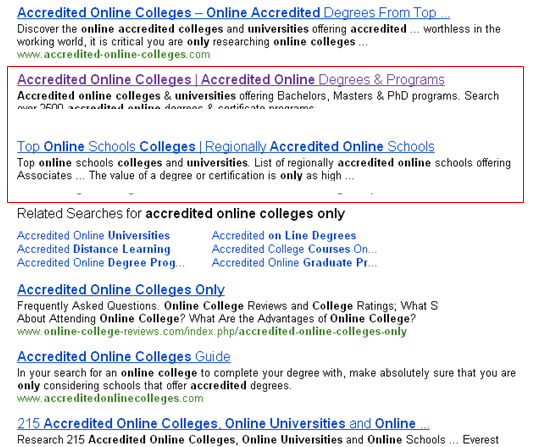
I worked for an online college portal website, which myself and two other SEOs worked on daily. We ranked well for some competitive terms, so I was interested to see what would happen if I started tweeting the phrase "accredited online colleges only" using the website's Twitter account. I also decided to retweet one of the tweets using my personal account, to see if that had any effect.
Here are the rankings before the tweets:
Bing: 2
Google: 5
Here are the rankings after the tweets:
Bing: 2 + 3
Google: 5
One week later, and after the Google Farmer/Panda content farm update, here are the rankings:
Bing 2 + 3
Google: 6
The page was already ranking on the middle of the first page for Google and in rank #2 for Bing. After the tweet from a non-influential account, no noticeable change occurred, except that two pages for the website began appearing in Bing.

Summary and analysis: The search term is a rather competitive term, so it is not a surprise that a couple of tweets from non-influential Twitterers would not affect the rankings. I do not know if the tweet had an effect on Bing's decision to show two results instead of one for the query.
Study #3
I wrote a summary of a New York Times article about the Fiske Guide, a list of colleges and universities on the Internet, developing an app for the iPad, which makes the guide interactive and useful for high school seniors and their parents. I titled the blog post "NY Times Summary: The Fiske Guide Goes iPad". After I wrote the article, I tweeted it using the work account. I also submitted it to StumbleUpon.
After the tweet and StumbleUpon submission, here were the rankings for the article for the search query "Fiske Guide", which I performed while logged out of Gmail, in an incognito window in Chrome, and using a Google location-independent query:
Google: 9
Bing: 56
Here is a snapshot of the traffic, which started from the first day.

One week later and after the Farmer/Panda update, here were the rankings:
Google: Page 13
Bing: 54
Summary and analysis: I think this one was caught by the Farmer/Panda update, because the ranking tanked after the update. Long-term ranking is inconclusive because of the algorithm update, but the trend holds true that an initial tweet helps a new article to be indexed and rank quickly.
Study #4
Now, here is where it gets interesting. In order to test if Twitter tweets had an effect on rankings, I decided to write another article called "What Is The Fiske Guide?" on the company blog. I then decided that I would wait a couple of days before tweeting it with the work account.
After the article was publish and no tweet was given, here were the rankings two days later for "Fiske Guide", using the same search terms as above:
Google: not found
Bing: not found
I then decided to tweet the article to see what might happen After the "no tweet" article was tweeted, here were the rankings:
Google: 35
Bing: n/a
One week later and after Farmer Update, the rankings had changed a bit:
Google: 8
Bing: 58
Summary and Analysis: I purposefully did not tweet out an article that I thought had a better chance of ranking than the first article. I let the article sit for two days, and it was not to be found in the search results. After the article was tweeted, it took a bit of time, but the article eventually made its way onto the first page of the Google search query "Fiske Guide."
Study #5
Once again, I needed to test and see if my suspicions were correct about social media signals helping articles to get discovered initially. I wrote a blog post called "Top 15 Inspirational Business Quotes", which I then tweeted.
It was published on Friday. After 4 tweets, which were comprised of one (1) from us, one (1) from a follower, and then retweets from two (2) of her followers, here were the rankings:
Google: 1
Bing: 2
And here was the organic traffic, which started on the day of publication:

Six days later, on a Thursday, the rankings were the same:
Google: 1
Bing: 2
The blog that I was writing on is fairly high-traffic, so Mr. Googlebot crawled it frequently. I noticed, however, that when I did not tweet an article, it would often take 2-3 days before it is crawled. When I did tweet the article, I received a Google Alert (I have one set up for the website) a couple of hours later, which showed that it had been discovered and indexed by Google.
Study #6
"Domain Trust Factors" (more competitive)
I wrote an article entitled "Four Factors that influence Domain Trust" and tweeted it to the world. I tweeted the URL three (3) times, and it was retweeted twice.
After the tweets from me and 2 retweets, here were the rankings for "Domain Trust Factors":
Bing: not found
Google: 48
It currently resides somewhere in the middle of the 5th page on Google. It was not found on Bing for a while because issues with my CMS.
Analysis and Conclusion: The article was indexed quickly, but it did not and does not rank well. From the previous examples, the ranking trend makes sense, because the term is more competitive, and the indexing trend also holds true.
Conclusion
I have come to believe that tweets, and possibly other social media signals, are becoming increasingly important for the search engines when trying to discover new material on websites. This has held true for the couple of websites that I administrate.
When new articles are tweeted, they are discovered and indexed quickly. When they are not tweeted, it takes the search engine bots more time to find and index them. This leads me to believe that search engines are watching Twitter feeds for indexation purposes, and when tweeters or retweeters are influential, they are using that information for ranking the articles.
The number of tweets and the number of tweeters, however, seems to make a difference for ranking. Articles that were just tweeted one time have reached a maximum of result #8. The two that were tweeted more times have ranked and are ranking higher. From this I think we can assume safely that the more times a new article or page gets tweeted, the better chance the target URL has of ranking well.
Three Takeaways
  • Always post the link on Twitter when you publish a new article. This is common sense for SEOs, but we should also recommend this to clients.
  • If possible, have 2-3 or more people who will always tweet your links. Since my findings show that the number of tweets may positively affect rankings, the more tweets you have guaranteed, the better chance your article will have of ranking, even for only a short period of time.
  • To bump an established link up in rankings, it seems necessary that the tweet come from a well-respected, influential, and relevant Twitter account. Of course, when the tweet comes from a respected account, it will often be retweeted numerous times (126 at last count, according to Topsy) and clicked many times (over 9,800 at last check).

If you have done any testing into a tweet's effect on rankings, please leave your findings in the Comments section below!
About the author: John Doherty is the newest member of Distilled NYC. You can find him on Twitter: @dohertyjf.

Make Facebook Comments Box Indexable by Search Engines


Roy Peleg

Make Facebook Comments Box Indexable by Search Engines

Dear SEO friends,

Recently I considered implementing the Facebook Comments Box in several sites. I tried to consider the pros and cons.
The obvious pros were (there are more):
  1. By default comments will be posted to the user's wall (though they can disable this), which can potentially create a lot of organic traffic and buzz.
  2. Fight spam as the user need a Facebook account to post a comment, which help fight agains most eviil spam bots out there (not to mention Facebook is at your side to stop the spammers as you can report the account and assist having it blocked).
  3. Facebook implemented a ranking algorithm that promotes comments which are more valuable
The two obvious cons were (there are more):
  1. Users need a Facebook account to post a comment
  2. Posts are not crawlable as they are loaded in an iFrame
The first one is an issue no doubt (for some more than others), but the second one is the critical one as far as I'm concerned. I almost gave up of the whole idea but after long researching I found a very valuable comment by a guy who identified himself as an engineer on the Facebook Platform team when asked about the crawlability of the comments. The guy said that there is a way to export the comments for any given URL with the help of a simple script (can be done in multiple programming languages). I don't know why didn't this make waves in the SEO world as I know that it's a common belief that Facebook comments aren't indexable and that they are closed behind the "Facebook walled Garden".

Here is a link to the script the guy offered (in PHP): http://www.rayhe.net/fb/comments.phps
Here is the resulting output of the script: http://www.rayhe.net/fb/comments.php

I was amazed by the simplicity of the code and that no authentication is needed. If you'll examine the code you'll also see that the comments can be styled easily to fit any site's layout. So basically you can now use Facebook Comments Box on your site and serve GoogleBot (or any other crawler/browser agent) with the comments to have them crawled & indexed. Obviously this won't be considered as cloaking as you're serving Google exactly what the users see (just like creating an HTML version for a Flash website).
One important point, I noticed that not all the comments are exported. Seems that for URLs with many comments (100s or 1,000s) only part of the comments are exported using the supplied code. It may be a bug or something by design, anyway, this requires more research.

Don't know about you, but this made me smile. I hope you'll find this useful as well, at least I think that now using Facebook comments is much more appealing.

Cheers,
Roy

P.S,
This of course opens the door for a lot of black hat SEO tricks, I'll let your imagination go wild :-)
Note from Jen: We got a lot of comments last week on our post about Facebook Marketing Tactics You Might Not Know About asking about Facebook comments. Hopefully this helps answer some of those questions. :)

Head Smacking Tip #20: Don't Ask Sites for Links. Find People and Connect.

Many of us trained in the ways of classical SEO are familiar with the link building process:
Step 1: Find relevant sites from which to get a link.
Step 2: Search for contact information (email or phone number).
Step 3: Get in touch and find a way to make the link happen (sell them on great content, do a trade in-kind, plant a seed and hope, etc.)
If you've ever done this (for the first 2 years of my SEO career, it's practically all I did), you know how much it sucks. Conversion rates are low. Time/link is high. The ROI is there, but it's a painful, boring, awkward slog.
I've got some good news. There's a better way.
Try this instead:
Step 1: Find relevant human beings (bloggers, journalists, forum participants, members of online communities, active social networkers, people in media, PR, or simply the well-connected).
Step 2: Follow their contributions to the web world and engage (in blog comments, over Twitter, via LinkedIn, through Q+A sites and forums, or directly over email). Ask for nothing.
Step 3: Build something highly relevant and useful to them. If you've truly built that connection and gotten to "know them," even if it's just virtually, you will know what they need/want/will appreciate.
Step 4: Let them know about it. This can be over Twitter, Facebook, LinkedIn, email, in a blog comment, or whatever medium makes sense.
There's huge advantages to this method, including:
  • More Scalable Link Building: Content plays can approach dozens of folks who may influence, write for or control multiple properties leading to a much higher ROI for each successful contact.
  • People Like People: People who answer webmaster@somesite.com don't particularly like link requests.
  • Authenticity: Rather than simply begging for a link to help your SEO, you're actually forming connections that can help with every form of marketing - greater brand awareness, attention from influencers, social sharing, etc.
  • Future Proof: No matter what signals engines evolve to measure or what forms of discovery become popular, your work carries value. If Facebook sharing takes over the web, it's not a problem because that's how people will share your links. If some new platform wins, you can rest assured that your content will make its way there.
  • Better Web Content: Since you're producing material that fill a need, you're helping to make the web a better place - there's nothing more deserving of a link or rankings than that.
Admittedly, the hardest part is Step 1: "Finding the Right People." Allow Google to assist:
Profile Search for Travel Bloggers
Pictured above is a Google "profile" search. You can search Google's public user profiles with search query strings like this http://www.google.com/search?q=travel+blogger&tbs=prfl:e or by appending &tbs=prfl:e onto any search URL.
It's also easy to use tools like FollowerWonk and LinkedIn Search to supplement these results. Armed with these tools and this process, I'm bullish that any SEO with the passion to invest time and the freedom to build quality resources can earn great links, mentions and social metrics from real people across the web.
Good luck out there link builders. I'll have my fingers crossed that this process can reduce friction and pain for people on both sides of the link equation. If you've got any additional recommendations, tools or methods to share, feel free to do so in the comments!

An SEO's Guide to HTTP Status Codes (An Infographic)


Dr. Pete

An SEO's Guide to HTTP Status Codes (An Infographic)

A while back, I started thinking about how the different status codes and redirects (301s, 302s, etc.) might look visually. I started drawing up some ideas for what was going to be an illustrated blog post, but then it suddenly dawned on me that I was slowly creating an infographic. I then proceeded to have a conversation with myself about how I could never create an infographic and was probably doomed. Depression turned into mania which turned into depression - this happened about 47 times between 9:00 and 9:14am. Actually, that's the start of my typical day.
I could go on, but I'll just cut to the chase. I took the most useful HTTP status codes, from an SEO perspective, and illustrated how they work. It's half cheat-sheet, half-infographic, and mostly just an excuse for me to have some fun. Hopefully, somebody learns something. This is completely my fault, so if you gouge your own eyes out with a spork to escape the horror, don't sue SEOmoz.
Click the image to see the full-sized version. A few technical notes:
  • As I mention about 301/302, I've abbreviated some of the official names for design purposes.
  • The visual format required a black-and-white interpretation. Search-engines handle 302s inconsistently.
  • Rel-canonical is obviously not a status code, but it's a functional relative that I felt should be included.
Comments are welcome. Did I miss any of your favorites? There are dozens, of course, but many are similar or almost never used. The 400-series alone has dozens of status codes, actually, most of which I had honestly never heard of in 13 years of full-time web work.

4 shopping wordpress themes - mindsets and inspiration


Sofa Shoppr - WP3.0+ Webshop Theme
Download Source
What other people say:
Great theme!! but i would like to know if there is a client area (log in…register, etc – if not how can i do it) and if there is the possibility to use cupons
thanks a lot
Hi, can use a form like “Cash on Location” instead of paypal chekout? How can I do it? (ie. Contact7 plugin or php script) Thanks a lot, lovely design.
The Jewelry Shop - WordPress eCommerce
Download Source
Discussion:

Everyone, read the following please carefully!!

I am working on finishing the update and on launching the new support system so please be a little patient as I will be a little slower with replying to your emails!
Please help me by not sending multiple requests or by not resending the same support email a second or third time. This goes for posting support requests here as well!
The update will be announced on Twitter.
Additionally, just to give you a heads-up, very soon we will be activating a new Support system and support will only be offered online so contacting me by email will not be possible after that.
The email account you have been using so far will be suspended.
Everyone still using this email as a means for contact will get an auto reply informing them of this once the support system is launched.
This was just to prepare you and not to be caught by surprise. Once you get the auto reply just follow the instructions provided and support may continue through the proper channel :)
I’m sure it will take a little time getting used to but I am also confident it will be an improvement for all involved!
In the mean time, please use the provided Documentation to find answers to your questions.
Hi,
Was wondering are we able to change the background and the tabs. column colors easily?
Will there be any guide to help us on this?
Appreciate your reply. Thanks!
The Furniture Store - WordPress eCommerce Shop
Download Source
Some Comments:
Hello Sarah,
I have figured out the case with the shop by brand custom widget. However I would like to ask you one more thing.
Is there any way to include some featured products on the front page of the store, as well as to divide this huge front page image in to a few smaller, so that way you could be able to promote several products.
Thank you in advance, Ivaylo
Hello Sarah,
Still not getting address in the pdf or saved under the orders tab. Have updated to the latest version of the theme, and carried out the fixes mentioned in our previous correspondence.
I still have your login details active if you need to have a look. I will send this comment to you via email as well and include the previous correspondence and login details
Cheers
enVirashop - eCommerce Wordpress Theme
Download Source
What other people say:
hi i bought this theme today, installed it in wordpress. Wordpress says: The following themes are installed but incomplete. Themes must have a stylesheet and a template.
Can you or anyone help me please
bye degisim

5 fantabulous backend wp themes


Twicet Business & Portfolio - Wordpress - 5 in 1
Download Source
Community Comments:
Hi Kriesi,
I bought your theme on themeforest.net and is really enjoying its design and userfriendlyness. However I have one question concerning the little arrow and the small pictures on the right side in the middle of the page: Is there anyway to completely delete this function? I mean can you help me with which file and what linenumber to edit to remove any trace of the small images and arrow? I only want one picture on the front page and nothing else.
Your help would be very appreciated!
Kind Regards
Kjetil
Kriesi,
I would like to change the homepage imageslider transition.
All i’m after is that the slide doesnt fade down then load the next but rather the next slide fades up ontop of the current one..
I’ve looked thru all 44 pages.. I know you say its custom change etc, but thought you would be able to point me in the right direction so I can change it myself?
thanx
MindPress - Mindblowing WordPress Business Theme
Download Source
Community Comments:
What’s the best approach to stopping the slider box on pages other than the homepage? The dynamic motion is great at first but becomes quickly distracting.
Here’s a suggestion for future release of this and other themes: include a pause button on sliders, and give user ability to jump to slide of their choice. Users love to drive.
Good job! Fresh and clean man. Thanks for coding.. Good Luck..
Protofolio Business & Portfolio Wordpress - 5 in 1
Download Source
Community Discussion:
Still seeing the javascript error and the images are not showing in the TV screen (red “X”)
Nevermind…. I found the Documentation after I posted this, but I still have the javascript error:
Webpage error details
User Agent: Mozilla/4.0 (compatible; MSIE 8 .0; Windows NT 6 .0; WOW64 ; Trident/4.0; GTB0 .0; SLCC1 ; .NET CLR 2 .0.50727; Media Center PC 5 .0; .NET CLR 3 .5.21022; .NET CLR 3 .5.30729; .NET CLR 3 .0.30729) Timestamp: Sun, 7 Mar 2010 02:07:50 UTC
Message: ‘null’ is null or not an object Line: 78 Char: 5 Code: 0 URI : http://xxxxxxxx.com/new/wp-content/themes/Protofolio/js/ddtabmenu.js
PureCorpWP - WordPress promo theme
Download Source
Comments:
Hello, There is a CSS layout issue when using a Text Widget. The top of the post div is moved below the bottom of the right side bar.
Can you please fix this? I can provide screenshots if needed.
Karl
On the footer, The cufon text Quick contact, About, Tweet have become very small … as compared to the demo. How do I make them bigger ?
UniSphere Corporate
UniSphere Corporate
Download Source
Discussion:
Kool..that solved the problem.
I have one more doubt. Can we modify the code to get such kinda of functionality .. http://webtest.maatruka.com/test.png
About is the page Title. We Highlight it on the Top menu bar, In the sub-header and again show in above the page content.
If I click on any of the subpages shown in the left and want to go back to the About main page, the only option is to click on the menu item .
Instead, can we modify such a way as shown in the image.
I want to remove the page title above the page content and have that put it as a link on the sidebar.
Thanks, Madan Narra
Thanks! Works perfectly!
